While modern authentication protocols like OAuth 2.0 and mTLS are the de-facto standard these days, Kerberos-based (GSS-API/SPNEGO) authentication is still commonly used within many enterprise organizations. The challenge is that many modern applications and development frameworks do not natively support Kerberos authentication or provide libraries that make integration straightforward, which can make supporting these environments difficult.
The VCF Download Tool (VCFDT) is one such example. While it supports connecting to an HTTPS proxy with basic authentication, it does not natively support Kerberos authentication. This is where Px can help by acting as an intermediary running locally on the same system as VCFDT, enabling it to connect through a Kerberos-authenticated HTTPS proxy.
Here is a quick visual (thanks to ChatGPT) that demonstrates the connection flow from the client system (client.vcf.lab) running VCFDT, which uses an authenticated keytab from the Kerberos server (kdc.vcf.lab) to authenticate with the proxy server (proxy.vcf.lab). Once authenticated, VCFDT can connect to broadcom.com through the proxy to download the required software binaries and metadata.
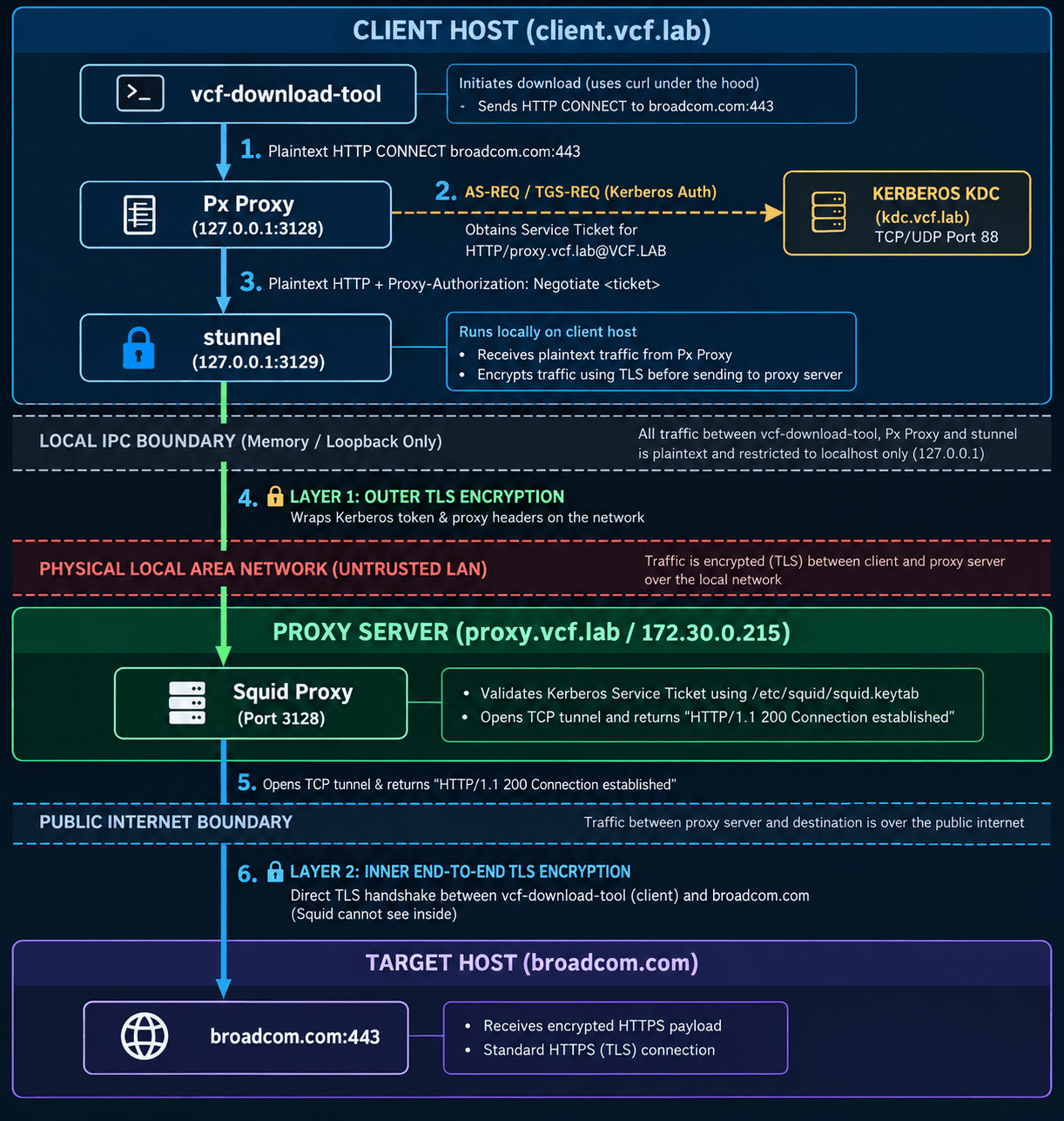
Step 1 - Install Px and Stunnel, as Px does not natively support connecting to an HTTPS-based upstream proxy if proxy-negotiate can not be used . In this setup, stunnel provides the TLS connection between Px and the HTTPS proxy. Install both by running the equivalent commands for your client system:
sudo apt update && sudo apt install stunnel4 python3-pip pipx -y
pipx install px-proxy
Step 2 - Reverse DNS (rDNS) and DNS canonicalization are enabled by default in Kerberos. When a connection is made to 127.0.0.1, or to a local hostname that resolves to 127.0.0.1, Kerberos performs a reverse DNS lookup to construct the Service Principal Name (SPN). If localhost is the primary entry for 127.0.0.1 in /etc/hosts, Kerberos constructs HTTP/*protected email*, causing authentication to fail.
We can workaround this on the client system by updating /etc/hosts to map proxy.vcf.lab ahead of localhost for 127.0.0.1 entry and this ensures the reverse lookup returns proxy.vcf.lab, allowing Kerberos to construct the correct SPN: HTTP/proxy.*protected email*.
Edit /etc/hosts file and ensure the 127.0.0.1 entry has your proxy FQDN ahead of localhost:
127.0.0.1 proxy.vcf.lab localhost
Step 3 - Here is an example of my configured Kerberos Client (/etc/krb5.conf) configuration:
[libdefaults]
    default_realm = VCF.LAB
    dns_lookup_realm = false
    dns_lookup_kdc = false

[realms]
    VCF.LAB = {
        kdc = kdc.vcf.lab:88
        admin_server = kdc.vcf.lab:749
    }

[domain_realm]
    .vcf.lab = VCF.LAB
    vcf.lab = VCF.LAB
Step 4 - Download the trusted Root CA for your proxy server to the client system. Update the stunnel configuration file (/etc/stunnel/squid-tls.conf) with the following configuration, replacing the values as needed for your environment:
pid = /run/stunnel4/squid-tls.pid
client = yes
foreground = no

[squid-https]
accept = 127.0.0.1:3129
connect = proxy.vcf.lab:3128
CAfile = /home/vmware/proxy.crt
verifyPeer = yes
checkHost = proxy.vcf.lab
Step 5 - Enable and restart Stunnel service by running the following commannds:
sudo systemctl enable stunnel4
sudo systemctl restart stunnel4
Step 6 - Launch Px using the following values, where --server specifies the local stunnel endpoint running on port 3129, which forwards the connection to your HTTPS proxy, and --port specifies the local port that Px will listen on for connections from VCFDT.
# Non-proxy negotiate env (requires Stunnel)
px --server=http://proxy.vcf.lab:3129 --listen=127.0.0.1 --port=3128
# proxy-negotiate capable env (does not require Stunel)
px --server=http://proxy.vcf.lab:3128 --listen=127.0.0.1 --port=3128
Note: Stunnel is not mandatory and does add another layer of encryption on the already encrypted HTTPS proxy traffic. For --proxy-negotiate capable environments, you avoid the double encryption by updating the --server port to 3128 which starting Px
Step 8 - Open a new terminal session and ensure you have a valid Kerberos ticket by authenticating with your username using the kinit command, or use the klist command to confirm that an existing ticket is still valid.
kinit william[at]VCF.LAB
To verify that everything is working correctly, we can perform the following test and confirm that the connection is successful:
curl -s -o /dev/null -v --proxy http://127.0.0.1:3128 https://williamlam.com
Step 9 - Lastly, we can now use the VCF Download Tool to connect to the local Px proxy and verify that it can successfully connect to broadcom.com through our Kerberos-authenticated HTTPS proxy and download a file, as shown in the example below.
vcf-download-tool metadata download --depot-store /tmp --depot-download-activation-code-file activation_code.txt --proxy-server 127.0.0.1:3128
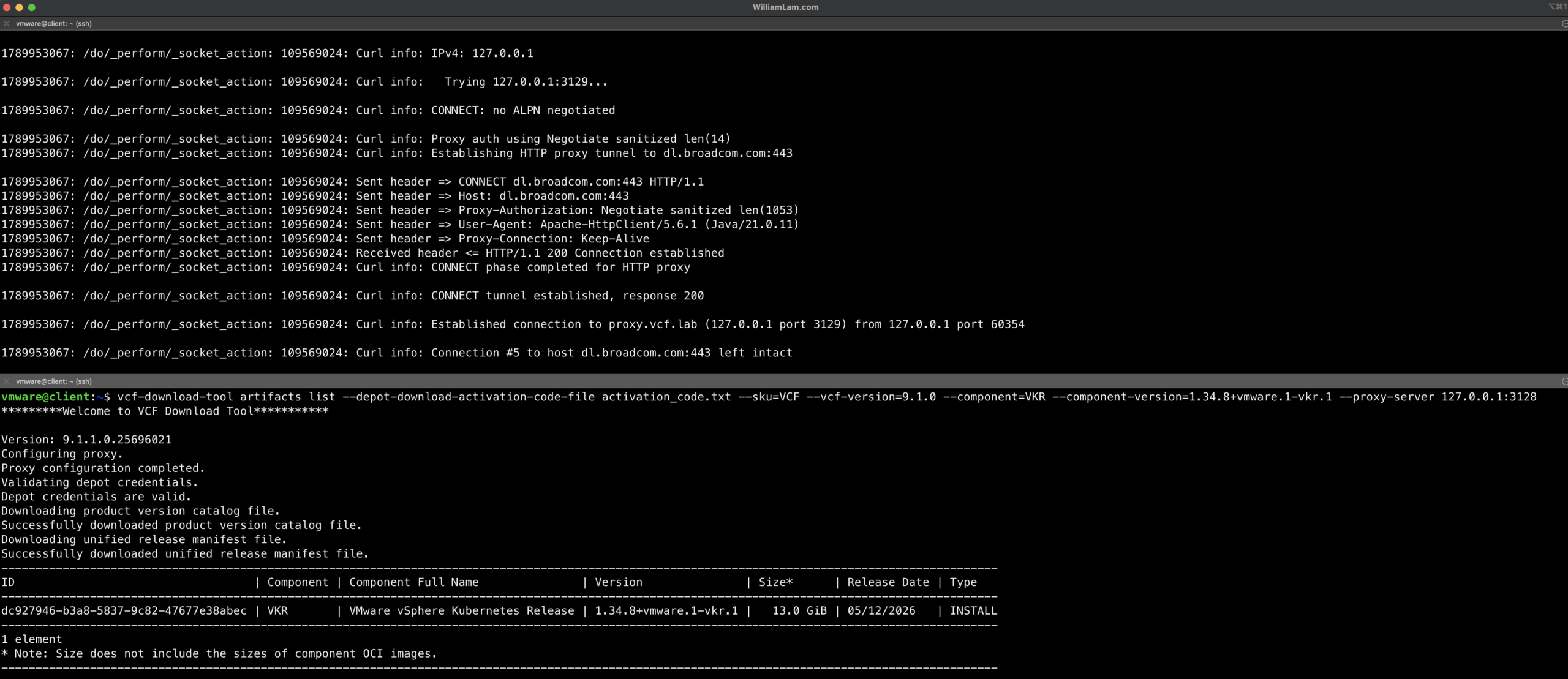
While many modern applications like VCFDT do not natively support Kerberos-based authentication, proxy tools like Px and Stunnel can bridge that gap and enable secure connectivity with traditional enterprise directory-based infrastructure.
Thanks for the comment!