For those who have been following my VCF Private AI Services (PAIS) exploration with deploying my own AI models and using them with Coding Agents running on VCF, I have found that these AI workloads can really push the thermals on my NVIDIA RTX 4000 running inside my Minisforum MS-A2, eventually causing the GPU to start throttling.
Earlier this year, I had shared a solution from a colleague who wanted to leverage a more capable GPU with vSphere Kubernetes Service (VKS) and was able to externalize the GPU using an OCuLink-based eGPU dock that is also compatible with the MS-A2.
I was initially going to use the same eGPU solution, which would have also required purchasing a separate PSU to power the GPU. While looking at my options, I came across another OCuLink eGPU dock (AG01) from Aoostar that had an integrated PSU (up to 800W), was plug-and-play ready, and certainly had a much cleaner aesthetic design.

In addition to its compact form factor, the AG01 came with the required PCIe OCuLink add-on card for the MS-A2 along with the OCuLink cable, all for a total of $179 USD (not including shipping), so I was pretty happy with my selection. In fact, the dock fits perfectly on top of my VCF 9.1 Mini-Rack, which also happens to be the perfect distance for connecting the OCuLink cable to the MS-A2.

OCuLink does no hot-plug support, so make sure the MS-A2 is powered off before connecting the eGPU dock. Once the dock is connected to power, simply power on the MS-A2 and the eGPU dock will automatically power on as well. Similarly, when the MS-A2 is shut down, the eGPU dock will also automatically power off.

Once ESX is up and running, you should be able to find your GPU under PCI Devices where you will be able to enable DirectPath I/O Passthrough just like any other PCIe-based connected device!
For those interested, I have been using OpenAI Codex to help debug and troubleshoot my VCF Private AI Services (PAIS) setup after noticing inconsistent performance, which ultimately turned out to be caused by thermal throttling while the GPU was running inside my MS-A2. As you can see, performance immediately improved once I moved the GPU to the eGPU dock connected to my MS-A2.
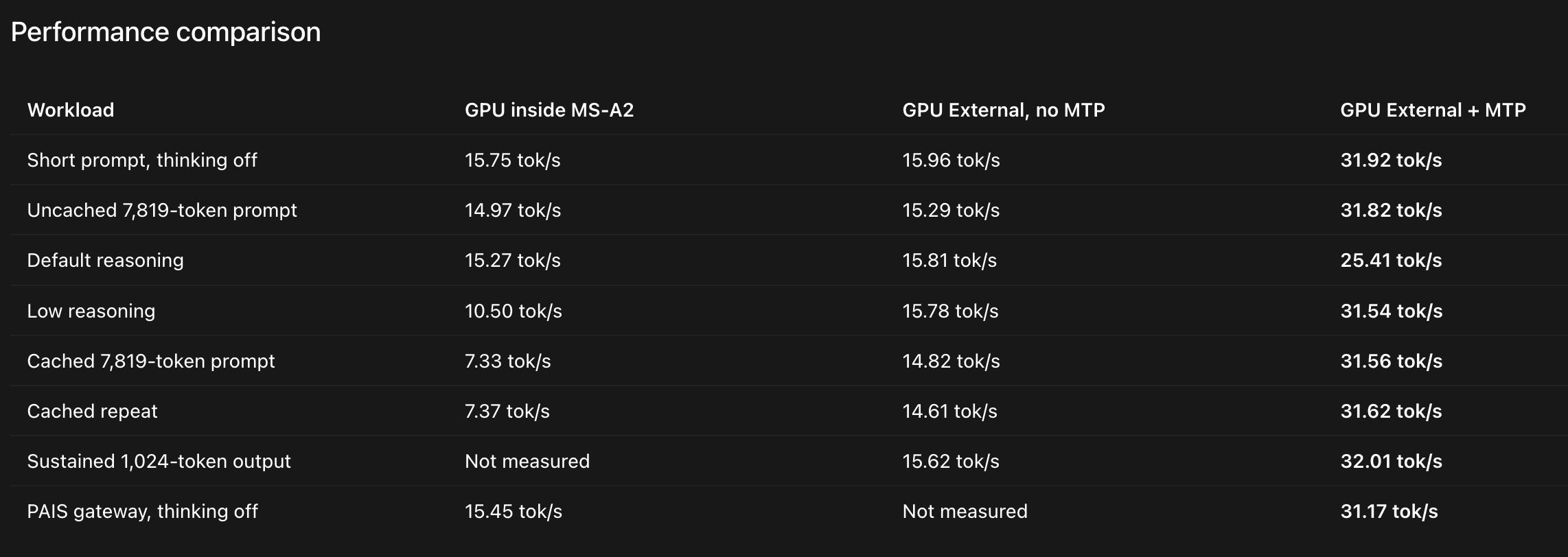
I also recently learned about Multi-Token Prediction (MTP), which is supported by AI models such as Qwen3.8 27B, and enabling MTP (llamaCPP server side configuration) provided another significant boost to the tokens per second (TPS).
humm indeed look nice, but you did not plug power cable flying around and ..untangle those either. Or drop a cofee or so and you bend those pcie connector. Connection are not to be move left-right.. Not the best.
Nice, I run an RTX 2000 inside the MSA2 and haven't tried to look at token rates as it heats up, good catch. I did Qwen optimization and will have to check to see if I have MTP enabled. I'm currently using OpenWeb UI and trying to aggregate my second RTX 2000 in the cluster. =) so OpenWeb UI at Connect Orlando will have two GPUs for python coding. You are ready to upgrade to the RTX 5000 or an L4 so you can get vGPUs going with Private AI. You are almost their, nice rig. I'm also looking at using the onboard vector DB on OpenWeb UI to do model augmentation. It's possible. So cool! -eric