An interesting set of deployment scenarios has been coming up as customers begin planning their upgrade to VMware Cloud Foundation (VCF) 9.1. Customers' existing deployments are often the result of years of organic growth, evolving operational requirements, and infrastructure constraints. Whether driven by available hardware, project timelines, or changing business priorities, today's deployment topology is not always the one customers would choose if they were starting from scratch.
For some customers, rather than performing a like-for-like upgrade, customers is using the transition to VCF 9.1 as a natural opportunity to consolidate and/or relocate some of their existing deployments, better aligning their architecture with current operational and infrastructure requirements.
UPDATE (08/01/2026) - This blog post has been updated with additional information, including step-by-step instructions for relocating VCF 5.x and 9.0.x Instances between Aria Operations/VCF Operations instances, example screenshots that walk through a relocation workflow, and a summary table covering all supported relocation scenarios. As part of validating these workflows, I have also shared this feedback with the product team to help improve the official VCF product documentation with this guidance.
VCF Instance Consolidation/Relocation
For customers with multiple VCF 5.x deployments, a common objective is to consolidate all or a subset of their VCF Instances into one or more VCF 9.1 Fleets. In addition to reducing operational overhead, this allows customers to take advantage of the centralized management capabilities introduced with VCF Fleets, which were not available in VCF 5.x.
In VCF 5.x, Aria Operations could integrate with a VCF 5.x Instance using either the standard Aria Operations integrations or VCF Aware Mode when deployed with Aria Suite Lifecycle Manager. Users had the ability to remove and re-add this integration, which effectively enabled VCF Instance relocation. However, this capability was a by-product of how Aria Operations integrations worked rather than an intentionally designed VCF Instance relocation workflow.
Since Aria Operations is a Day-N deployment in VCF 5.x, individual VCF 5.x Instances may or may not include a local VCF Operations instance. For VCF 5.x Instances that do include a local VCF Operations instance, upgrading to VCF 9.1 will result in each VCF Instance becoming its own independent VCF 9.1 Fleet.
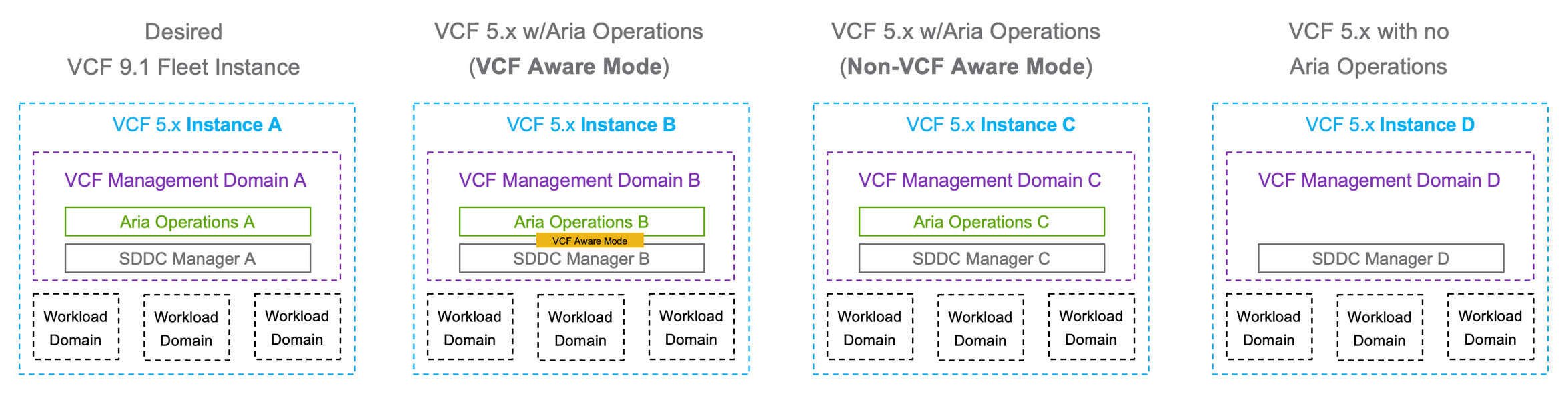
In the example above, we have four VCF 5.x Instances. Instance A will serve as the foundation for the new VCF 9.1 Fleet, while Instances B, C, and D will be consolidated into that same Fleet.
- Instance B - Contains a local Aria Operations instance deployed in VCF Aware Mode.
- Instance C - Contains a local Aria Operations instance deployed in standard (non-VCF Aware) mode.
- Instance D - Does not contain a local Aria Operations instance
Depending on how each VCF 5.x Instance (B, C, and D) is configured, the process for unregistering it from its local Aria Operations instance and re-registering it with another Aria Operations instance will vary based on the following scenarios:
- Scenario 1: Consolidate Instance B with Instance A's Aria Operations
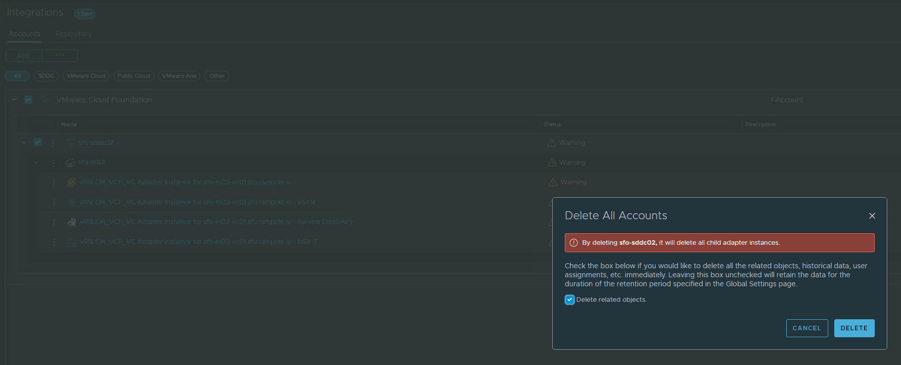
- Step 1 - Remove the VCF Instance integration from Aria Operations B
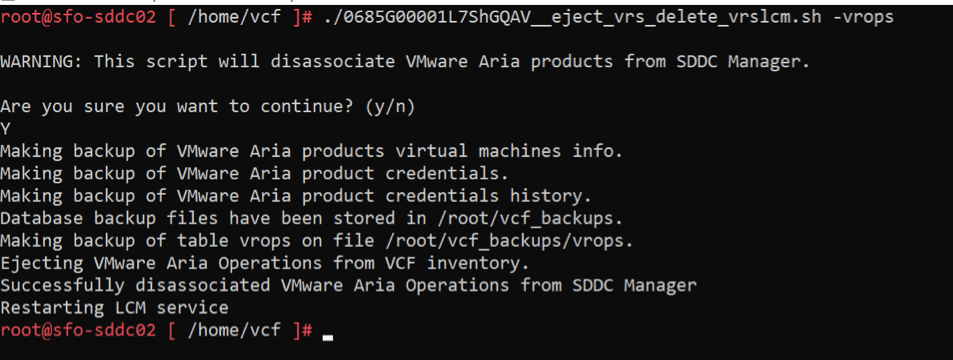
- Step 2 - Disassociate Aria Operations B from SDDC Manager B
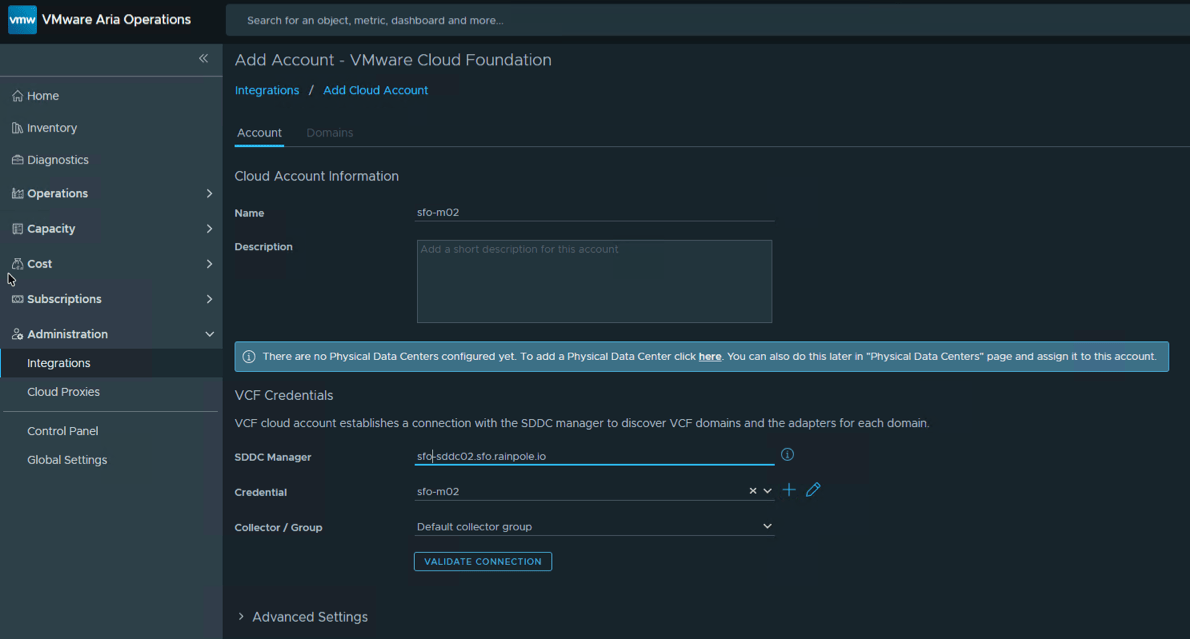
- Step 3 - Add the VCF integration from Instance B to Instance A's Aria Operations
- Scenario 2: Consolidate Instance C with Instance A's Aria Operations
- Step 1 - Remove the VCF Instance integration from Aria Operations C
- Step 2 - Add the VCF integration from Instance C to Instance A's Aria Operations
- Scenario 3: Consolidate Instance D with Instance A's Aria Operations
- Step 1 - Add the VCF integration from Instance D to Instance A's Aria Operations
Example Screenshots for Steps above:
Assuming all three scenarios above have been completed and the VCF 5.x Instances have been re-registered with the Aria Operations instance in VCF Instance A, upgrading to VCF 9.1 will result in the following VCF 9.1 Fleet:
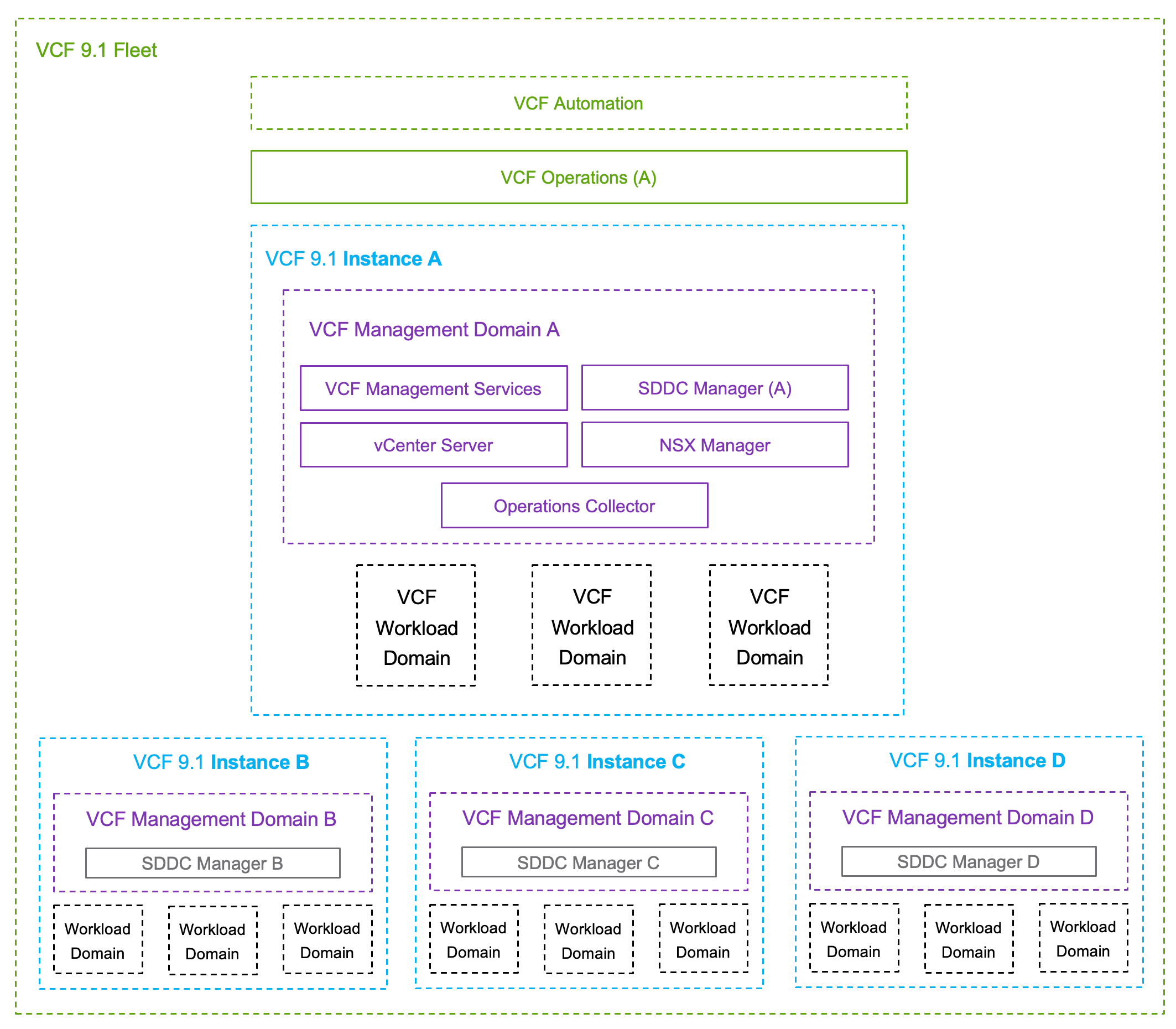
VCF Instance integration with VCF Operations 9.1 is handled differently, and there is currently no supported method to relocate a VCF 9.1 Instance that is part of a VCF 9.1 Fleet. Customers planning to consolidate or relocate VCF Instances should account for this during their VCF 9.1 upgrade planning, as these activities must be be completed before upgrading.
Additional Considerations:
- Aria Operations does not support migrating historical data to another Aria Operations instance, if you need to retain the historical metrics for planning or auditing purposes, you may want to retain the Aria Operations instances even after the unregistration process. If not, you can decommission the VM once you have successfully performed the relocation.
- Aria Operations should be updated to a minimum of 8.18 / 9.0 before attempting relocation, verify Aria Operations compatibility with the Broadcom Interoperability Matrix
- Ensure an VCF Operations Cloud Proxy is deployed within each relocated VCF Instance, prior to performing a VCF 9.1 upgrade, as this is a requirement for SDDC Manager and VCF Operations functionality
- Ensure that you have sufficient licensing entitlements configured within your primary Aria Operations before relocating your VCF Instances
VCF Fleet Consolidation/Relocation

Another scenario that has come up involves customers with multiple VCF 9.0.x Fleets looking to consolidate their VCF Instances into fewer VCF 9.1 Fleets. Prior to upgrading to VCF 9.1, VCF Instances can be relocated between VCF 9.0.x Fleets by removing the existing VCF Operations integration and registering the VCF Instance with another VCF Operations instance. This must be completed before upgrading to VCF 9.1, as there is currently no supported method to relocate a VCF 9.1 Instance that is part of a VCF 9.1 Fleet
VCF Instance Consolidation/Relocation with Existing VCF 9.1 Fleet
If you already have a VCF 9.1 Fleet deployed, either through a new deployment or an upgrade, and later decide to consolidate or relocate an existing VCF 9.1 Instance, this is currently not supported.
However, if you have VCF 5.x or VCF 9.0.x Instances that have not yet been upgraded to VCF 9.1, you can still relocate those VCF Instances into an existing VCF 9.1 Fleet before performing the upgrade. This approach provides the greatest flexibility, allowing you to immediately take advantage of the benefits of a VCF 9.1 Fleet while upgrading the relocated VCF Instances to VCF 9.1 on your own timeline using VCF 9.1 Fleet Lifecycle Management.
| Scenario | Operation | Supported |
|---|---|---|
| 1 | Relocate VCF 5.x Instance without Aria Operations to VCF 9.1 Fleet | ✅ |
| 2 | Relocate VCF 5.x Instance with Aria Operations to VCF 9.1 Fleet | ✅ |
| 3 | Relocate VCF 5.x Instance with Aria Operations (VCF Aware Mode) to VCF 9.1 Fleet | ✅ |
| 4 | Relocate VCF 9.0.x Instance with VCF Operations to VCF 9.1 Fleet | ✅ |
| 5 | Relocate VCF 9.1 Instance to VCF 9.1 Fleet | ❌ |
- Scenario 1:
- Step 1: Add VCF 5.x SDDC Manager Integration to VCF 9.1 Operations in VCF 9.1 Fleet
- Scenario 2:
- Step 1: Remove the VCF 5.x Instance integration from its local Aria Operations
- Step 2: Add VCF 5.x SDDC Manager Integration to VCF 9.1 Operations in VCF 9.1 Fleet
- Scenario 3:
- Step 1: Remove the VCF 5.x Instance integration from its local Aria Operations
- Step 2: Disassociate VCF 5.x Aria Operations from its local SDDC Manager
- Step 3: Add VCF 5.x SDDC Manager Integration to VCF 9.1 Operations in VCF 9.1 Fleet
- Scenario 4:
- Step 1: Remove VCF 9.0.x Instance from VCF 9.0 Operations
- Step 2: Add VCF 9.0.x SDDC Manager Integration to VCF 9.1 Operations in VCF 9.1 Fleet
- Scenario 5:
- Not Supported
Additional Considerations:
- Aria Operations does not support migrating historical data to another Aria Operations instance, if you need to retain the historical metrics for planning or auditing purposes, you may want to retain the Aria Operations instances even after the unregistration process. If not, you can decommission the VM once you have successfully performed the relocation.
- Aria Operations should be updated to a minimum of 8.18 / 9.0 before attempting relocation, verify Aria Operations compatibility with the Broadcom Interoperability Matrix
- Ensure an VCF Operations Cloud Proxy is deployed within each relocated VCF Instance, prior to performing a VCF 9.1 upgrade, as this is a requirement for SDDC Manager and VCF Operations functionality
- Ensure that you have sufficient licensing entitlements configured within your primary Aria Operations before relocating your VCF Instances
VCF Fleet & Instance Consolidation/Relocation Futures
Given the growing interest in this use case as customers plan their VCF 9.1 deployments, this capability is being evaluated by product management for a future VCF 9.1 release. The goal is to enable VCF Instance relocation as a Day-N operation rather than as part of the upgrade workflow, reducing both upgrade complexity and the operational risk associated with making multiple architectural changes during an upgrade.
If this is something you might be interested in or have other use cases or requirements, feel free to leave a comment with as much detail as you can and I will be sure to forward this to the product team for their considerations.
Hi William, can you point me to a statement if and where NAT is supported in the management path? We are mostly interested between Fleet Level / Management Domain componentens and Workload Components.
I'll do you one better, see https://knowledge.broadcom.com/external/article/344283/using-nat-between-the-vcenter-server-sys.html
We've never supported NAT even between the standalone components and it is certainly not supported when it comes to VCF as a solution. We only document what we support, so the lack of documentation = not supported
Hi William,
Following up on your call for use cases regarding fleet/instance
relocation.
Two sites running vSphere 8, being converged to VCF 9.1. DC1 is the
intended primary site and should host the fleet-level components.
DC1's management cluster is currently two hosts with vSAN, hosting its
own vCenter, so per KB 422658 it cannot be converged today. A third
host is coming. DC2 has a conforming cluster now.
That leaves me converging DC2 first, which permanently places the
fleet-level components on the secondary site.
My question is whether that is reversible.
1. Once DC1 is converged as an additional instance in the same fleet,
is there any supported path to move the fleet-level components
(fleet lifecycle, Salt RaaS, software depot, log management) from
the DC2 instance to the DC1 instance?
I understand scenario 5 in your table is not supported, but that
is instance relocation between fleets. Relocating the fleet-hosting
role between two instances of the same fleet reads as a different
operation, and I could not find it documented either way. The Live
Site Recovery planned migration path in "Data Protection and
Recovery of the VCF Fleet" appears to move the VMs to another site
rather than reassign the logical fleet role.
2. Your scenario 4 is supported. Would converging DC1 to VCF 9.0
first, relocating it into the existing 9.1 fleet, then upgrading it
to 9.1 be a viable path? Or does that still leave the fleet-level
components on DC2 regardless?
3. If neither works, is relocating the fleet-hosting role between
instances part of what product management is evaluating? The stated
goal is instance relocation as a Day-N operation, which reads as a
different capability.
The underlying issue is that convergence order determines fleet
placement, and hardware timelines rarely match architectural intent.
Thanks,
Basile