WilliamLam.com

  • About
    • About
    • Privacy
  • VMware Cloud Foundation
    • VMware Cloud Foundation 9.1
    • VMware Cloud Foundation 9.0
  • VKS
  • Homelab
    • Hardware Options
    • Hardware Reviews
    • Lab Deployment Scripts
    • Nested Virtualization
    • Homelab Podcasts
  • VMware Nostalgia
  • Apple

Search Results for: vmc

New SDDC Linking capability for VMware Cloud on AWS

11.03.2020 by William Lam // 1 Comment

Back in September, the VMware Transit Connect (vTGW) on VMware Cloud on AWS (VMConAWS) feature was released and provides users a simplified way of connecting AWS VPCs, AWS Direct Connect Gateways and customer on-premises datacenter from a networking connectivity standpoint. As part of this feature, a new logical construct called an SDDC Group was created which allows customers to easily apply common networking connectivity policies across a number of SDDCs versus having to manage them separately which can quickly get complex from an operational point of view.

The SDDC Group not only simplified the initial setup, but it also simplifies Day 2 Operations when new SDDCs are provisioned and added to the SDDC group. The networking policies that have been configured at the SDDC Group will automatically apply to all new SDDCs which makes this a really slick solution. As SDDCs are removed from the SDDC Group, the related configurations are automatically un-provisioning and detached from the respective networking resources.


Simplified network connectivity using an SDDC Group was just the beginning! Today, the VMware Cloud team has released a new feature built on top of the SDDC Groups construct called vCenter Linking for SDDC Groups. Just as the name implies, customers can now easily "Link" multiple vCenter Servers within an SDDC Group enabling a single view of all vCenter Servers using any one of the vSphere UIs within the SDDC. For those familiar with Enhanced Linked Mode (ELM), this is basically that but for SDDCs running in the Cloud!

The workflow could not have been simpler and last week I got try it out and was quite impressed! Under the hood, this leverages the vCenter Convergence capability and when enabling vCenter Linking, the service automatically handles all those details including the necessary NSX-T firewall rules that need to be configured across ALL SDDC to allow for secured connectivity. Just imagined having to do this each time a new SDDC is added or remove, you need to manually go to all SDDC and update or create new firewall rules!? This is all hidden away from the user and by simply associating SDDCs in the SDDC Group, the configurations are applied automatically for you.

Just setup an upcoming feature which builds on top of VMware Transit Connect Gateway (vTGW) allowing #VMWonAWS customers to now β€œLink” multiple SDDCs together. Just 1-Click, you now can access all Cloud vCenter Servers using any one vSphere UI. ELM for Cloud!#VMwareCloud pic.twitter.com/dImg6Yloe3

— William Lam (@lamw.bsky.social | @*protected email*) (@lamw) October 30, 2020

One question that I did have while trying out this new feature was how does this work with existing features such as Hybrid Linked Mode (HLM) and ELM?

[Read more...]

Categories // VMware Cloud on AWS Tags // ELM, Enhanced Linked Mode, HLM, Hybrid Linked Mode, SDDC Group, VMware Cloud, VMware Cloud on AWS

Custom Virtual Machine Class Types with vSphere with Tanzu

10.30.2020 by William Lam // 1 Comment

When you deploy a Tanzu Kubernetes Grid (TKG) Cluster using the integrated TKG Service in vSphere with Tanzu, you can specify a Virtual Machine Class Type which determines the amount of CPU and Memory resources that are allocated for both the Control Plane and/or Worker Node VMs for your TKG Cluster.

Here is a sample YAML specification that uses the best-effort-xsmall VM class type for both Control Plane and Worker Node, but you can certainly override and choose different classes based on your requirements.

apiVersion: run.tanzu.vmware.com/v1alpha1
kind: TanzuKubernetesCluster
metadata:
  name: william-tkc-01
  namespace: primp-industries
spec:
  distribution:
    version: v1.17.8+vmware.1-tkg.1.5417466
  settings:
    network:
      cni:
        name: antrea
      pods:
        cidrBlocks:
        - 193.0.2.0/16
      serviceDomain: managedcluster.local
      services:
        cidrBlocks:
        - 195.51.100.0/12
  topology:
    controlPlane:
      class: best-effort-xsmall
      count: 1
      storageClass: vsan-default-storage-policy
    workers:
      class: best-effort-xsmall
      count: 3
      storageClass: vsan-default-storage-policy

Today, the are a total of 16 VM Class types that you can select from, however these are not customizable which is something that has been coming up more recently. The vSphere with Tanzu team is aware of this request and is working on a solution that not only makes customizing CPU and Memory easier but also supporting storage customization. As you can see from the table below, 16GB is only supported configuration today.


In the mean time, if you need a supported path for customizing your TKG Guest Clusters, one option is to use the TKG Standalone / MultiCloud CLI, which can be used with a vSphere with Tanzu Cluster. You will need to deploy an additional TKG Management Cluster (basically a few VMs), but once you have that, you can override CPU, Memory and Storage of both the Control Plane and Worker Nodes using the following environment variables:

  • VSPHERE_WORKER_NUM_CPUS
  • VSPHERE_WORKER_MEM_MIB
  • VSPHERE_WORKER_DISK_GIB
  • VSPHERE_CONTROL_PLANE_NUM_CPUS
  • VSPHERE_CONTROL_PLANE_MEM_MIB
  • VSPHERE_CONTROL_PLANE_DISK_GIB

If you are interested, the easiest way to get started is by using my TKG Demo Appliance Fling which was just recently updated to the latest TKG 1.2 release which has support for K8s v1.19 which is currently not available on vSphere with Tanzu.

Now, you might ask, would it be possible to create your own custom VM class types using vSphere with Tanzu? Well .... keep reading to find out πŸ™‚

Disclaimer: This is not officially supported by VMware, use at your own risk. These custom changes can potentially impact upgrades or automatically be reverted upon the next update or upgrade. You have been warned.

[Read more...]

Categories // Kubernetes, VMware Tanzu Tags // vSphere Kubernetes Service

Automated Nested Lab Deployment on SDDC Part 3: Google VMware Cloud Engine

10.29.2020 by William Lam // 1 Comment


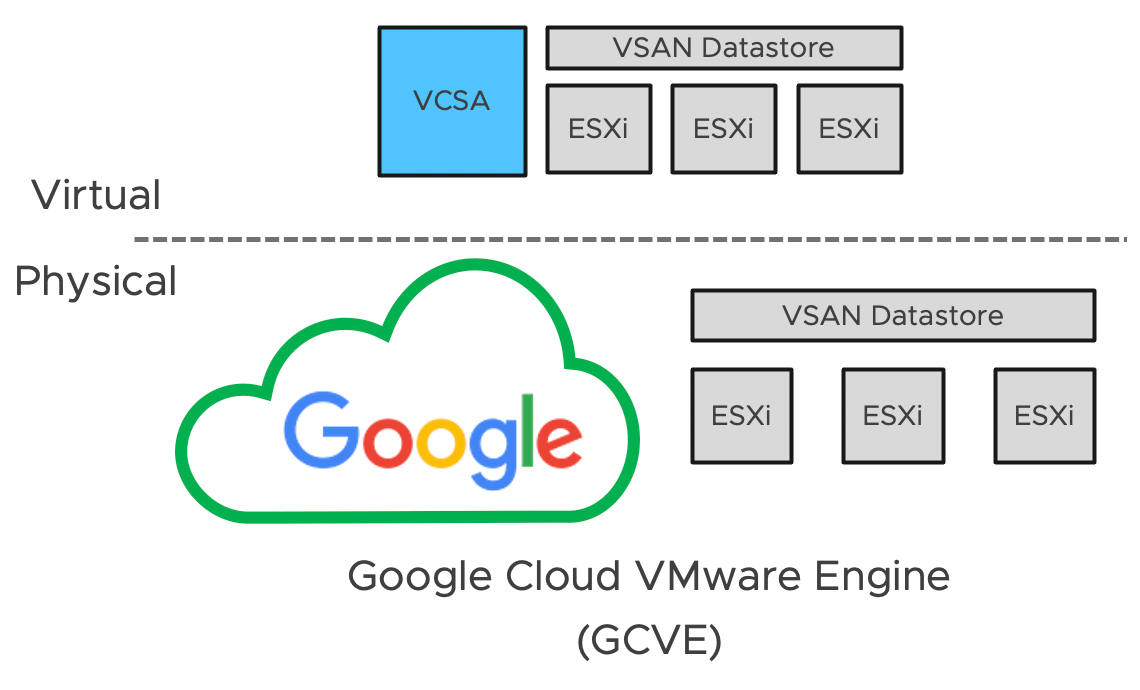
In Part 3 of this series, we will be taking a look at deploying our Nested Lab in a Google Cloud VMware Engine environment. One thing you may notice that is different between VMConAWS and AVS is that we are actually running a Nested vSAN on top of the physical vSAN within GCVE. In the current version of GCVE, customers have the ability to "escalate" their privileges from the default and this would allow us to configure the necessary ESXi advanced setting so that we do not have to rely on an NFS setup. For networking, customers also have full access to the NSX-T Manager instance and this means that MAC Learning can be enabled which will allow inner-guest workloads will be able to communicate properly within and outside of the Nested Lab deployment.

Disclaimer: Nested ESXi is not officially supported on Google Cloud VMware Engine or by VMware.

[Read more...]

Categories // Nested Virtualization Tags // Google Cloud VMware Engine, VMware Cloud

  • « Previous Page
  • 1
  • …
  • 26
  • 27
  • 28
  • 29
  • 30
  • …
  • 55
  • Next Page »

Search

Thank Author

Author

William is Distinguished Platform Engineering Architect in the VMware Cloud Foundation (VCF) Division at Broadcom. His primary focus is helping customers and partners build, run and operate a modern Private Cloud using the VMware Cloud Foundation (VCF) platform.

Connect

  • Bluesky
  • Email
  • GitHub
  • LinkedIn
  • Reddit
  • RSS
  • Twitter
  • Vimeo

Recent

  • Configuring OIDC with PKCE in Keycloak for VCF Private AI Services 08/26/2026
  • VCF 9.1 - Understanding VCF Converge & Import Scenarios for vCenter Server Without NSX 08/24/2026
  • VCF 9.1 - Configuring Harbor to use VCF Identity Broker (IDB) for External Identity Federation 08/19/2026
  • Quick Tip: The Fastest Way to Clear Partitions for ESX Reinstallation 08/15/2026
  • Quick Tip: Reducing High CPU Utilization in VCF Automation (VCFA) on AMD Zen4/Zen5 CPUs 08/12/2026
Privacy & Cookies: This site uses cookies. By continuing to use this website, you agree to their use.

To find out more, including how to control cookies, see here: Cookie Policy

Copyright WilliamLam.com © 2026

Loading Comments...