One easy way to integrate with Microsoft Teams is to use an incoming webhook which can be configured on a per-channel basis. While working on creating some new PowerShell functions for the VMware Event Broker Appliance (VEBA), I was stuck trying to figure out how to properly encode an emoji icon into the MessageCard type for sending a message to a teams channel.
After a bit of searching and some trial/error, I finally found that you needed to use the emoji hex code with the following format:
&#x<EMOJI-HEX-CODE>;
I used this site here to find the emoji to hex code translation. In addition, I also found that the emojis will only render when used in either the activityTitle or text property of the MessageCard. I was initially trying use this within the facts property which does not work.
Here is a working PowerShell example on constructing the the MessageCard JSON which utilizes emojis:
$teamsMessage = [PSCustomObject][Ordered]@{
    "@type"      = "MessageCard"
    "@context"   = "http://schema.org/extensions"
    "themeColor" = '0078D7'
    "summary"      = "VMC SDDC Deleted"
    "sections"   = @(
        @{
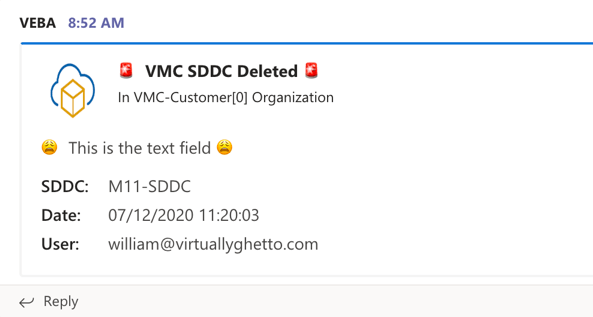
            "activityTitle" = "🚨 **VMC SDDC Deleted** 🚨";
            "activitySubtitle" = "In VMC-Customer[0] Organization";
            "activityImage" = "https://blogs.vmware.com/vsphere/files/2019/07/Icon-2019-VMWonAWS-Primary-354-x-256.png"
            "facts" = @(
                @{
                    "name" = "SDDC:";
                    "value" = "M11-SDDC";
                },
                @{
                    "name" = "Date:";
                    "value" = "2020-07-12T11:20:03.364000Z";
                },
                @{
                    "name" = "User:";
                    "value" = "*protected email*";
                }
            );
            "markdown" = $true;
            "text" = "😩 This is the text field 😩";
        }
    )
}

$body = $teamsMessage | ConvertTo-Json -Depth 5
Invoke-WebRequest -Uri $teamsWebhookURL  -Method POST -ContentType "application/json" -Body $body | Out-Null
Here is what the rendered Microsoft Teams message will looks like posting to the webhook: