WilliamLam.com

  • About
    • About
    • Privacy
  • VMware Cloud Foundation
    • VMware Cloud Foundation 9.1
    • VMware Cloud Foundation 9.0
  • VKS
  • Homelab
    • Hardware Options
    • Hardware Reviews
    • Lab Deployment Scripts
    • Nested Virtualization
    • Homelab Podcasts
  • VMware Nostalgia
  • Apple
You are here: Home / ESXi / Quick Tip: Selective ESX Host Patching in VCF 9.1

Quick Tip: Selective ESX Host Patching in VCF 9.1

08.10.2026 by William Lam // 2 Comments

Prior to VMware Cloud Foundation (VCF) 9.1, users could choose whether to apply an ESX update across all or a selected set of vSphere Clusters, but there was no additional granularity for selecting specific ESX hosts within a cluster. This has been a frequently requested capability, especially for excluding specific ESX hosts from an update or performing a controlled rollout across one or more vSphere Clusters.

Fleet Lifecycle Management in VCF 9.1 has been enhanced with a new custom host selection capability that allows users to select specific ESX hosts within a vSphere Cluster for patching.

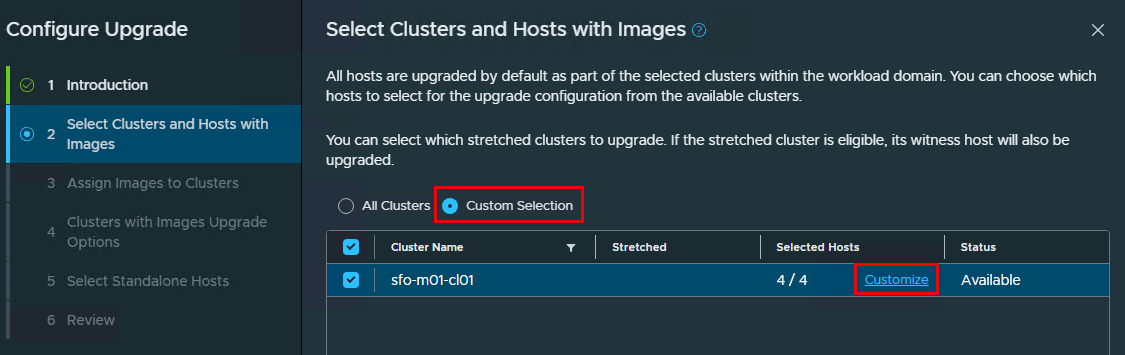
During the ESX Configure Upgrade workflow in VCF Operations, you will continue to have the existing option of selecting either all vSphere Clusters or the new Custom Selection option. When the Custom Selection is chosen, a Customize button is enabled for each selected vSphere Cluster.

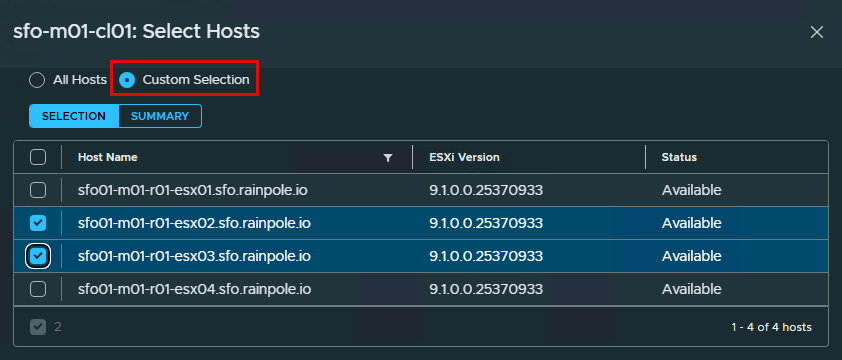
For the selected vSphere Cluster, you can now choose the specific ESX hosts to include as part of the configured patch plan.
Categories // ESXi, VMware Cloud Foundation Tags // VCF 9.1

Comments

  1. *protectedvccamposg says

    08/12/2026 at 7:27 am

    In vSphere 8, when doing updates at the cluster level on the Image Compliance page in the vSphere client, one host can be selected instead of selecting Remediate ALL. On VCF 9.0.2, can the same process from vSphere 8, be followed from the vSphere client connecting to the vCenter at the cluster level without breaking SDDC Inventory/Workflows?

    Reply
    • William Lam says

      08/12/2026 at 7:41 am

      As long as the same vLCM image is used, since that needs to be imported into SDDCm, you can patch using VC and then set desired image in VCF and it should be no-op as hosts are at desired version

      Reply

Thanks for the comment!Cancel reply

This site uses Akismet to reduce spam. Learn how your comment data is processed.

Search

Thank Author

Author

William is Distinguished Platform Engineering Architect in the VMware Cloud Foundation (VCF) Division at Broadcom. His primary focus is helping customers and partners build, run and operate a modern Private Cloud using the VMware Cloud Foundation (VCF) platform.

Connect

  • Bluesky
  • Email
  • GitHub
  • LinkedIn
  • Reddit
  • RSS
  • Twitter
  • Vimeo

Recent

  • Configuring OIDC with PKCE in Keycloak for VCF Private AI Services 08/26/2026
  • VCF 9.1 - Understanding VCF Converge & Import Scenarios for vCenter Server Without NSX 08/24/2026
  • VCF 9.1 - Configuring Harbor to use VCF Identity Broker (IDB) for External Identity Federation 08/19/2026
  • Quick Tip: The Fastest Way to Clear Partitions for ESX Reinstallation 08/15/2026
  • Quick Tip: Reducing High CPU Utilization in VCF Automation (VCFA) on AMD Zen4/Zen5 CPUs 08/12/2026
Privacy & Cookies: This site uses cookies. By continuing to use this website, you agree to their use.

To find out more, including how to control cookies, see here: Cookie Policy

Copyright WilliamLam.com © 2026

Loading Comments...