WilliamLam.com

  • About
    • About
    • Privacy
  • VMware Cloud Foundation
    • VMware Cloud Foundation 9.1
    • VMware Cloud Foundation 9.0
  • VKS
  • Homelab
    • Hardware Options
    • Hardware Reviews
    • Lab Deployment Scripts
    • Nested Virtualization
    • Homelab Podcasts
  • VMware Nostalgia
  • Apple

Updated findings for passthrough of Intel NUC Integrated Graphics (iGPU) with ESXi

11.17.2022 by William Lam // 48 Comments

While searching for drivers for another Intel NUC platform, I saw that Intel had recently published new graphic drivers for Linux including support for their new Intel Arc GPUs. This of course got me curious on wondering whether this would help at all with the issues regarding passthrough of the integrated graphics (iGPU) for recent Intel NUCs? ?

As a refresher, starting with the 11th Gen Intel NUCs, passthrough of the iGPU on Windows had stopped working and would result in the infamous Windows Error Code 43 and even worse on the 12th Gen Intel NUCs, Windows would simply BSOD after the initial reboot. The behavior is also simliar for Linux operating systems, while it better handles the issue by not crashing the OS, iGPU passthrough is also not functional for Linux systems.

To be honest, I had low expectations these new Linux graphic drivers would behave any differently, but I decided for the sake of persistency that I would give it one more go. I had access to both an Intel NUC 12 Extreme (Dragon Canyon) and Intel NUC 12 Pro (Wall Street Canyon), both of which included recent Intel iGPUs.

??? is the only way I could describe what I had discovered after my testing!
[Read more...]

Categories // ESXi, Home Lab, vSphere 7.0, vSphere 8.0 Tags // Dragon Canyon, ESXi 7.0 Update 3, ESXi 8.0, GPU, Intel Arc, Iris Xe, Wall Street Canyon

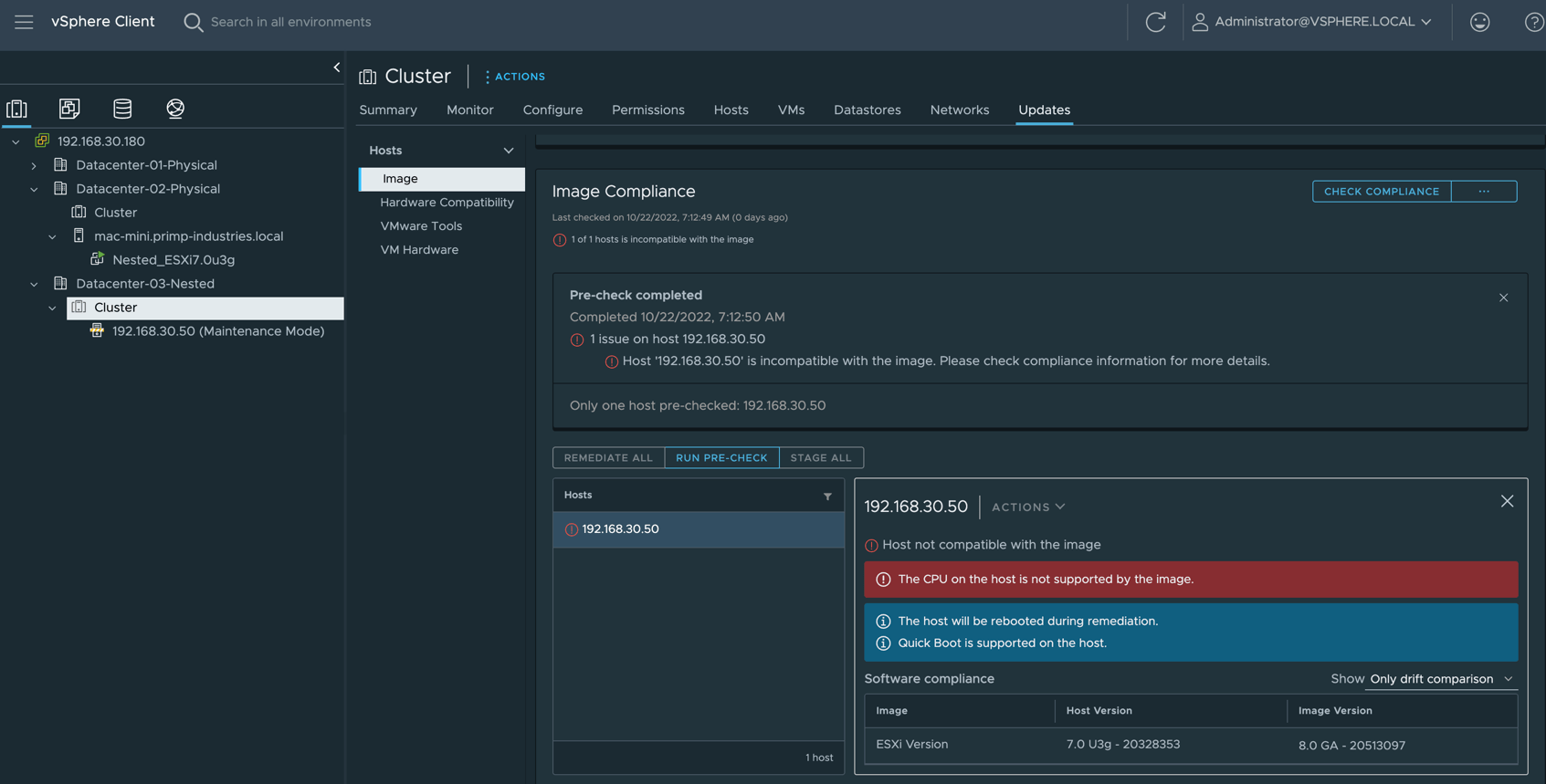
Using vSphere Lifecycle Manager (vLCM) to remediate Nested ESXi host with CPU on the host is not supported 

10.24.2022 by William Lam // 4 Comments

If you are running a Nested ESXi VM on top of a physical ESXi host that does not have a supported CPU and you are using vSphere Lifecycle Manager (vLCM), the pre-check and/or remediation will fail due to the following error:

The CPU on the host is not supported by this image


The solution is actually quite simple and is similiar to what you had to do for your physical ESXi host by adding the ESXi kernel boot option allowLegacyCPU=true to successfully boot and install ESXi as recently explained in this blog post. To emulate this setup, I am using my trusty 2011 Apple Mac Mini which is running ESXi 8.0 with the kernel boot option and it is then running a Nested ESXi 7.0 Update 3g VM.

[Read more...]

Categories // Home Lab, Nested Virtualization, vSphere 8.0 Tags // ESXi 8.0, Nested ESXi, vSphere 8.0, vSphere Lifecycle Manager

Quick Tip - TPM 2.0 connection cannot be established after upgrading to ESXi 8.0

10.18.2022 by William Lam // 12 Comments

There has been several reports from folks internally and within the community that after upgrading to ESXi 8.0, they are now seeing the following TPM error message:

TPM 2.0 device detected but a connection cannot be established.


The common theme between all these reported cases that I have seen is that they are all using an Intel NUC. While the Intel NUCs may list TPM support, they do not support either TPM Interface Specification (TIS) for TPM 1.2 or the First In, First Out (FIFO) for TPM 2.0, which are industry standards for communicating with a TPM device that ESXi uses.

[Read more...]

Categories // ESXi, Home Lab, vSphere 8.0 Tags // ESXi 8.0, TPM, vSphere 8.0

  • « Previous Page
  • 1
  • …
  • 19
  • 20
  • 21
  • 22
  • 23
  • …
  • 57
  • Next Page »

Search

Thank Author

Author

William is Distinguished Platform Engineering Architect in the VMware Cloud Foundation (VCF) Division at Broadcom. His primary focus is helping customers and partners build, run and operate a modern Private Cloud using the VMware Cloud Foundation (VCF) platform.

Connect

  • Bluesky
  • Email
  • GitHub
  • LinkedIn
  • Reddit
  • RSS
  • Twitter
  • Vimeo

Recent

  • VCF 9.1.2 - ESX Kickstart using vSphere Configuration Profiles (VCP) 11/25/2026
  • Quad-Port Remote KVM Upgrade for my VCF Lab 11/20/2026
  • vCenter Linking Replaces Enhanced Linked Mode (ELM) in VVF & VCF 9.x 11/18/2026
  • VCF 9.1.x Upgrade Sequence with Shared NSX Manager 11/17/2026
  • Quick Tip - How to Manually Verify VCF Software Download Checksums? 11/09/2026
Privacy & Cookies: This site uses cookies. By continuing to use this website, you agree to their use.

To find out more, including how to control cookies, see here: Cookie Policy

Copyright WilliamLam.com © 2026

Loading Comments...