WilliamLam.com

  • About
    • About
    • Privacy
  • VMware Cloud Foundation
    • VMware Cloud Foundation 9.1
    • VMware Cloud Foundation 9.0
  • VKS
  • Homelab
    • Hardware Options
    • Hardware Reviews
    • Lab Deployment Scripts
    • Nested Virtualization
    • Homelab Podcasts
  • VMware Nostalgia
  • Apple

Search Results for: vSphere with Kubernetes

Tanzu Kubernetes Grid (TKG) Demo Appliance for VMC and vSphere

05.11.2020 by William Lam // 8 Comments

As some of you can probably tell from my recent Twitter updates and blog posts (here and here) that I have been spending some time lately with both vSphere with Kubernetes and Tanzu Kubernetes Grid (TKG). Like many of you in the community, I am still pretty new to Kubernetes (K8s) and I am still learning about what it has to offer both from an infrastructure standpoint but more importantly how it can be used to deliver new and modern applications. I am also very lucky to be part of the the VMware Event Broker Appliance Open Source Fling project which builds and runs on top K8s and this project has allowed me to really get hands on which is how I learn best.

A couple of months back I was asked to put together a workshop to demonstrate how to deploy TKG Clusters running on VMware Cloud on AWS (VMC) and while developing the workshop, I thought it would be really cool if I could make it even easier for anyone that is brand new to K8s to quickly get started with TKG. I wanted to have a solution that can literally be dropped into any supported vSphere-based environment with basic networking to go from Zero to Kubernetes in less than 30 minutes!

Enter the Demo Appliance for Tanzu Kubernetes Grid (TKG) Fling

A Virtual Appliance that pre-bundles all required dependencies to help customers in learning and deploying standalone Tanzu Kubernetes Grid (TKG) clusters running on either VMware Cloud on AWS and/or vSphere 6.7 Update 3 environment for Proof of Concept, Demo and Dev/Test purposes. This appliance will enable you to quickly go from zero to Kubernetes in less than 30 minutes with just an SSH client and a web browser!


In addition to the appliance, I have also put together a step by step workshop-style guide which not only walks you through in deploying your first TKG Cluster but also provide some example demos and references which you can explore further. Below are some of the highlights of the Demo Appliance for TKG:

[Read more...]

Categories // Kubernetes, VMware Cloud on AWS, VMware Tanzu Tags // Harbor, Kubernetes, Tanzu Kubernetes Grid, TKG, TKG CLI, VMware Cloud on AWS, vSphere 6.7 Update 3

Sneak peek at deploying Tanzu Kubernetes Grid on vSphere & VMware Cloud on AWS

03.16.2020 by William Lam // 1 Comment

Last week, VMware had its huge launch which included VMware Cloud Foundation 4, vSphere 7, vSAN 7 and the brand new VMware Tanzu Portfolio that will help organizations build, run and manage modern applications for their business. Although we still have a couple of more months before general availability, the level of excitement for these upcoming releases was pretty amazing to see on social media, especially for the highly anticipated Kubernetes with vSphere capability, formally known as Project Pacific.

UPDATE (04/10/20) - TKG 1.0 has officially GA'ed, you can now deploy TKG Clusters using the new TKG CLI/UI as demonstrated in this blog post.

  • TKG Release Notes
  • TKG Download
  • TKG Documentation

When vSphere 7 is available, Kubernetes with vSphere is just one way in which customers will be able to deploy upstream and conformant Open Source Kubernetes also referred to as Tanzu Kubernetes Grid (TKG). For customers that require a solution today or for those that may not able to upgrade to vSphere 7 immediately, VMware has another option called Tanzu Kubernetes Grid Plus for vSphere and VMware Cloud on AWS which was also announced last week but albeit not many folks took notice.


There are few things worth mentioning about Tanzu Kubernetes Grid Plus:

  1. Tanzu Kubernetes Grid Plus is a new offering that is comprised of the core TKG software and it includes support from VMware's Customer Reliability Engineering (CRE), which is a team made up of Kubernetes Architects that can help customers design and architect their Cloud Native Applications running on the VMware Tanzu Platform
  2. For customers that do not require CRE support and just want standard VMware GSS Support, then you can simply use Tanzu Kubernetes Grid (TKG) which includes VMware Support and Subscription (SnS)
  3. The core TKG software which Tanzu Kubernetes Grid Plus includes can deploy Tanzu Kubernetes Cluster (upstream K8s running in VMs). Customers can already do this right now by using Cluster API (CAPI) and specifically the Cluster API Provider for vSphere (CAPV) which provides lifecycle management of Tanzu Kubernetes Cluster running on any valid vSphere endpoint including VMware Cloud on AWS. The latest CAPV v1alpha3 release also introduces a new workflow that reduces the number of steps compared to v1alpha2 which is now deprecated

For customers that want to further customize how Tanzu Kubernetes Cluster are deployed and configured including tools that they are already using, CAPV will be the most flexible option. Having gone through the CAPV workflows myself, I think it can still be daunting if you are new to this space, not to mention the different CLI tools that you will have to learn to have a successful deployment. Luckily, the VMware TKG team has also been thinking about the overall user experience and how they can build on top of CAPV to provide a much more simpler and more intuitive interface for customers that is just looking for a turnkey option.

Here is a sneak peek (Technical Preview) of the upcoming Tanzu Kubernetes Grid CLI or TKG CLI for short which will make deploying Tanzu Kubernetes Cluster on ANY vSphere endpoint incredibly EASY!

[Read more...]

Categories // Kubernetes, VMware Cloud on AWS, VMware Tanzu Tags // Kubernetes, Tanzu Kubernetes Grid, TKG, TKG CLI, VMware Cloud on AWS

How to deploy a Kubernetes Cluster on vSphere?

09.05.2014 by William Lam // 18 Comments

In the previous article, we walked through the installation of govmomi which is the vSphere SDK for Go and govc which is a command-line interface that uses the SDK to expose vSphere functionality which is used in the Kubernetes vSphere Provider. Now that we have all the prerequisites installed, we are now ready to deploy a Kubernetes Cluster onto a vSphere based infrastructure.

google-kubernetes-vmware-vsphere
UPDATE (10/26/15) - It looks like the instructions on setting up a Kubernetes Cluster has since changed and I have updated the instructions below. One of the main changes is instead of building from source we are just downloading the Kubernetes binaries.

tep 1 - You will need to download the latest Kubernetes binary (kubernetes.tar.gz) which can be found here. At the time of updating this article, the latest is v1.2.0-alpha2.

Step 2 - Go ahead and extract the contents of kubernetes.tar.gz file by running the following command:

tar -zxvf kubernetes.tar.gz

Step 2 - Download the Kubernetes VMDK using either "wget" or "curl" depending on what is available on your system. Since I am on a Mac, it only has curl by default. Here are the two commands depending on the which download utility you have access to:

wget https://storage.googleapis.com/govmomi/vmdk/kube.vmdk.gz{,.md5}
curl -O https://storage.googleapis.com/govmomi/vmdk/kube.vmdk.gz{,.md5}

deploy-kubernetes-on-vsphere-1
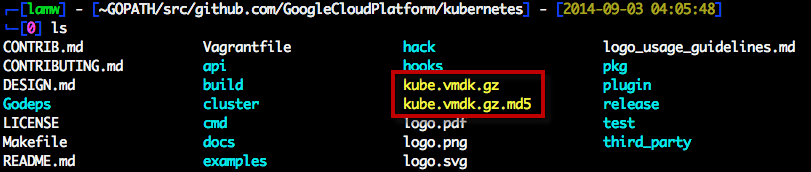
Once the download has completed, you should now see two files in your working directory: kube.vmdk.gz and kube.vmdk.gz.md5

deploy-kubernetes-on-vsphere-2
Step 3 - Next we need to un-compress the VMDK by running the following command:

gzip -d kube.vmdk.gz

Step 4 - Once the VMDK has been extracted, we will need to upload it to a vSphere datastore. Before doing so, we need to set a couple of environmental variables that provide connection details to your vSphere environment. Below are the commands to set the environmental variables, you will need to replace the information from your own environment.

export GOVC_URL='https://[USERNAME]:[PASSWORD]@[ESXI-HOSTNAME-IP]/sdk'
export GOVC_DATASTORE='[DATASTORE-NAME]'
export GOVC_DATACENTER='[DATACENTER-NAME]'
export GOVC_RESOURCE_POOL='*/Resources'
export GOVC_GUEST_LOGIN='kube:kube'
export GOVC_INSECURE=true

You can leave the last three variables as-is. The GOVC_RESOURCE_POOL defines the full path to root Resource Pool on an ESXi host which will always exists and for vCenter Server, it is the name of the vSphere Cluster or Resource Pool the GOVC_GUEST_LOGIN is the credentials to the Kubernetes Master/Node VMs which are defaulted in the VMDK that was downloaded. The last variable GOVC_INSECURE is if you have an ESXi or vCenter Server using self-signed SSL Certificate, you will need to ensure this variable is set.

To upload the kube.vmdk to the vSphere Datastore and under the kube directory which will be created for you, you will run the following command:

govc datastore.import kube.vmdk kube

deploy-kubernetes-on-vsphere-3
Step 5 - We now have our base kube.vmdk uploaded to our ESXi host and before we are ready to deploy our Kubernetes Cluster, we need to set the provider by running the following command:

export KUBERNETES_PROVIDER=vsphere

Step 6 - We are now ready to deploy the Kubernetes Cluster which consists of Kubernetes Master and 4 Kubernetes Minions and they will be derived from the kube.vmdk that we just uploaded. To do so, you will run the following command:

kubernetes/cluster/kube-up.sh

deploy-kubernetes-on-vsphere-6
Note: If you see a message about "Docker failed to install on kubernetes-minion-N" it is possible that this related to a timing issue in which the Minion may not be up when the Master is checking. You can verify this by running the next command, else you can follow the instructions to bring down the Kubernetes Cluster and re-creating it.

Step 7 - In the previous step, we deployed the Kubernetes Cluster and you will see the assigned IP Addresses for the Master/Minions along with the credentials (auto-generated) for the Docker Containers. We can confirm that the everything was created successfully by checking the number of running Minions by running the following command:

cluster/kubecfg.sh list minions

Screen Shot 2014-09-04 at 9.52.13 PM
Step 8 - Once we have confirmed we have 4 running Minions, we can now deploy a Docker Container onto our Kubernetes Cluster. Here is an example of deploying 2 nginx mapping from port 8080 to 80 instances by running the following command:

cluster/kubecfg.sh -p 8080:80 run dockerfile/nginx 2 myNginx

deploy-kubernetes-on-vsphere-8
Step 9 - We should expect to see two "Pods" for the nginx instances we have instantiated and we can do so by running the following command:

cluster/kubecfg.sh list pods

deploy-kubernetes-on-vsphere-9
Here are some additional commands to stop and remove the Pods:

cluster/kubecfg.sh stop myNginx
cluster/kubecfg.sh rm myNginx

You can also bring down the Kubernetes Cluster (which will destroy the Master/Minion VMs) by running the following command:

cluster/kube-down.sh

Hopefully this gave you a good introduction to the new Kuberenetes vSphere Provider and I would like to re-iterate that this is still being actively developed on and the current build is an Alpha release. If you have any feedback/requests or would like to contribute, be sure to check out the Kubernetes and govmomi Github repository and post your issues/pull requests.

Categories // ESXi, vSphere Tags // Docker, ESXi, go, govc, govmomi, Kubernetes, vSphere

  • « Previous Page
  • 1
  • …
  • 7
  • 8
  • 9
  • 10
  • 11
  • …
  • 46
  • Next Page »

Search

Thank Author

Author

William is Distinguished Platform Engineering Architect in the VMware Cloud Foundation (VCF) Division at Broadcom. His primary focus is helping customers and partners build, run and operate a modern Private Cloud using the VMware Cloud Foundation (VCF) platform.

Connect

  • Bluesky
  • Email
  • GitHub
  • LinkedIn
  • Reddit
  • RSS
  • Twitter
  • Vimeo

Recent

  • Major Enhancements to VCF 9.1 Upgrade Planner Tool 10/22/2026
  • VCF 9.1.1 - New UI Support for Deploying VCF Management Services (VCFMS) & VCF Automation (VCFA) on Non-Management Networks 10/19/2026
  • VCF Agentic AI Hub (Code Assist) MCP Server Fling 10/05/2026
  • Automate Inventory of vSphere Supervisor Clusters & vSphere Kubernetes Service (VKS) Guest Clusters 10/02/2026
  • VCF 9.1.1 - OCuLink External Graphics (eGPU) Dock with integrated PSU for GPU Passthrough with VKS 10/01/2026
Privacy & Cookies: This site uses cookies. By continuing to use this website, you agree to their use.

To find out more, including how to control cookies, see here: Cookie Policy

Copyright WilliamLam.com © 2026

Loading Comments...