WilliamLam.com

  • About
    • About
    • Privacy
  • VMware Cloud Foundation
    • VMware Cloud Foundation 9.1
    • VMware Cloud Foundation 9.0
  • VKS
  • Homelab
    • Hardware Options
    • Hardware Reviews
    • Lab Deployment Scripts
    • Nested Virtualization
    • Homelab Podcasts
  • VMware Nostalgia
  • Apple

VCF Agentic AI Hub (Code Assist) MCP Server Fling

10.05.2026 by William Lam // 11 Comments

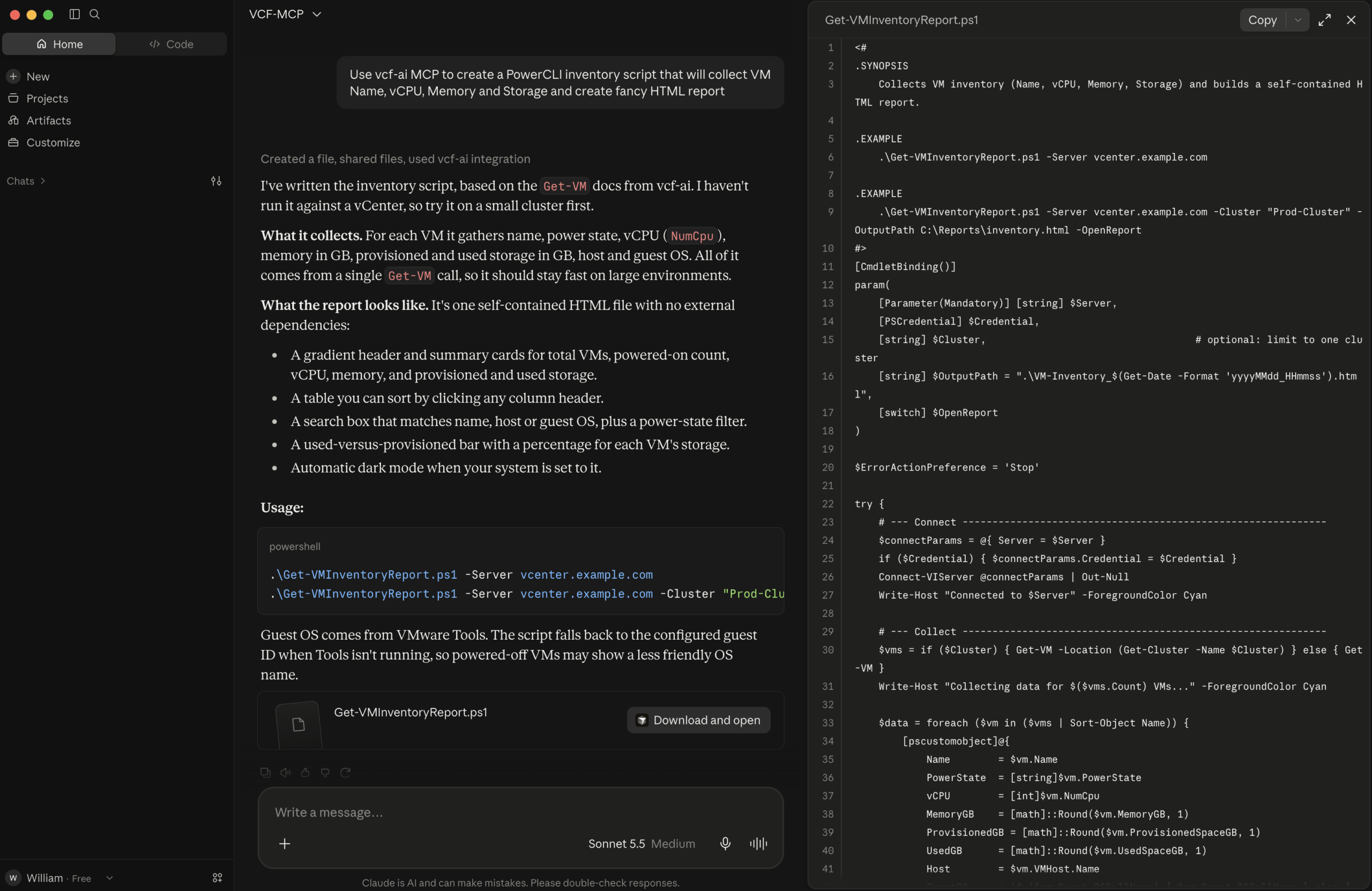
Creating scripts to help automate repetitive tasks or generate reports is a common need for every VMware administrator, and with Agentic coding tools like Claude Code, Codex, and Cursor, to name a few, the barrier to entry has been significantly lowered. In fact, when I spoke with attendees at VMware Explore Las Vegas 2026 about their use of coding agents, I saw a dramatic shift compared to the previous year, from maybe 20% to now over 80%!

However, one key challenge you may have experienced when using AI models (LLMs) is that they can still hallucinate and make up a non-existent REST API endpoint or PowerCLI cmdlet. LLMs are designed to always provide an answer, even when that answer may be wrong.

To help address this challenge and provide modern LLMs with the required VCF context for developing scripts and automation, a new Fling has just been released called VCF Agentic AI Hub (VCF-AI), which is delivered as a standalone virtual appliance. VCF-AI includes a VCF Code Assist MCP Server that currently supports code generation for the following VCF SDKs:

  • VCF PowerCLI
    • vCenter Server
    • vSAN
    • VCF Operations
    • SDDC Manager
    • NSX
    • vSphere Supervisor
    • HCX
    • SRM
  • VCF Python SDK
    • vCenter Server
    • vSAN
    • vSAN Data Protection
    • VCF Operations
    • VCF Installer
    • SDDC Manager
    • NSX
    • vSphere Supervisor
    • VCF Operations for Networks
    • Log Management
    • VCF Fleet and SDDC LCM

VCF-AI includes all the OpenAPI specifications and documentation for the two SDKs, which cover a number of VCF components along with skill files that have been created by VCF Engineering to allow users to easily create automation using their favorite Agentic coding agent.
[Read more...]

Categories // PowerCLI, VMware Cloud Foundation Tags // MCP, PowerCLI, python, VCF

VMware Cloud Foundation (VCF) Homelab Hardware Options

12.05.2024 by William Lam // 9 Comments

I have been getting a ton of inquiries lately, both internally as well as externally for hardware recommendations for building a new or updating an existing homelab/test environment to be able to deploy the full VMware Cloud Foundation (VCF) solution. I typically receive at least half a dozen inquiries per week about general VMware Homelabs, but it has increased in volume lately, perhaps it was due to the recent US Black Friday and Cyber Monday Sales or perhaps some are preparing for VCF 9 already?

In any case, I normally point users to my crowdsourced VMware Community Homelab Project, where users can submit their hardware build-of-materials (BOM), overall cost and the VMware solutions they are currently using.


While the VMware Community Homelab Project has been running for several years now and has helped numerous users, the majority of the submissions typically focus on subset of the VMware portfolio and only handful of submissions have included VCF and more importantly, some of the submissions are several years old.

Internally, a number of folks have shared more recent BOMs for building an environment to run the latest VCF 5.x release and I have also found several folks outside of VMware doing the same, so I thought it would be useful and timely to aggregate some of their hardware configurations to help give users an idea of what works and options as they are looking to revamp their lab going into 2025.

[Read more...]

Categories // Home Lab, VMware Cloud Foundation Tags // VCF, VMware Cloud Foundation

Quick Tip - Character Limits for VMware Cloud Foundation (VCF) Objects

04.05.2024 by William Lam // Leave a Comment

Similar to my blog post on character limits for the different types of vSphere Inventory Objects, here is a quick look on some VMware Cloud Foundation (VCF) Objects and their respective character limits.

While looking into this topic, I was pleasantly surprised to find that some of the rename workflows in SDDC Manager UI includes an informational icon that provides the naming constraints in addition to the character limit. I was able to test and verify the character limits by using a combination of the SDDC Manager UI and API and below were my findings as of the VCF 5.1 release.

Object Character Limit Minimum Character Limit Maximum
Management Domain 3 20
Workload Domain 3 20
Network Pool 3 40
Organization Name 3 20
Edge Cluster 1 80

Categories // VMware Cloud Foundation Tags // VCF, VMware Cloud Foundation

  • 1
  • 2
  • 3
  • …
  • 5
  • Next Page »

Search

Thank Author

Author

William is Distinguished Platform Engineering Architect in the VMware Cloud Foundation (VCF) Division at Broadcom. His primary focus is helping customers and partners build, run and operate a modern Private Cloud using the VMware Cloud Foundation (VCF) platform.

Connect

  • Bluesky
  • Email
  • GitHub
  • LinkedIn
  • Reddit
  • RSS
  • Twitter
  • Vimeo

Recent

  • VCF Agentic AI Hub (Code Assist) MCP Server Fling 10/05/2026
  • Automate Inventory of vSphere Supervisor Clusters & vSphere Kubernetes Service (VKS) Guest Clusters 10/02/2026
  • VCF 9.1.1 - OCuLink External Graphics (eGPU) Dock with integrated PSU for GPU Passthrough with VKS 10/01/2026
  • VCF 9.1.1 - Single ESX Host for VCF Fleet, VCF Workload Domain or VCF Cluster 09/30/2026
  • Bypassing Minimum Unique Flows & Metric Collection Period for vDefend Security Services Platform (SSP) 5.2 Lab Deployments 09/28/2026
Privacy & Cookies: This site uses cookies. By continuing to use this website, you agree to their use.

To find out more, including how to control cookies, see here: Cookie Policy

Copyright WilliamLam.com © 2026

Loading Comments...